
• Please review our updated Terms and Rules here

Tandy 1000 Parallel Ports, Part II

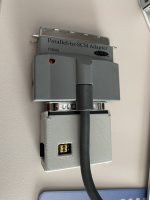
My belikin adapter-drivers. I attached my BlueScsi to it and put a 30MB Hardfile on the SD card.
Installation process hangs on hardware detection, I think I have to config this manually.
Of course I use a usb-poer adapter for the external BlueScsi (not shown in the pictures) because
I think there is not enough, or any power on the LPT2SCSI cable/adapter.


Readme says:

Code:
See the file README95.TXT for information on Windows 95 drivers.

DOS utilizes the following files:

            ASPI.SYS    09-21-95 10:18a Version 4.00H
            INFO.EXE    09-21-95 10:18a Version 4.00H
         DISKDRV.SYS    12-23-94  9:24p Version 3.01
           CDROM.SYS    12-23-94  9:24p Version 3.01
        CDPLAYER.COM    12-23-94  9:24p Version 3.01
         SCSIFMT.COM    12-23-94  9:24p Version 3.01

ASPI.SYS Command Line Options:

   ASPI.SYS  [/P:<port# list>]                  ; Enable Port(s)
         [/A[=<port#>[:<port address>]]]    ; Set Port Address
         [/T[=<port#>[:<target# list>]]]    ; Enable Target(s)

         [/B[=<port#>[:<target# list>]]]    ; Force Bi-Directional
                        ;  on target(s)
         [/U[=<port#>[:<target# list>]]]    ; Force Uni-Directional
                        ;  on target(s)

         [/BS[=<port#>[:<target# list>]]]   ; Force Bi-Directional Safe
                        ;  on target(s)
         [/US[=<port#>[:<target# list>]]]   ; Force Uni-Directional Safe
                        ;  on target(s)

         [/S[=<port#>[:<target# list>]]]    ; Force Save Mode
                        ;  on target(s)

         [/X]                               ; Pause before driver exits


              port# = Supports port numbers 0,1 & 2
            Target# = Supports target numbers 0,1,2,3,4,5 & 6
           port address = Any Standard or Non-Standard parallel
                  port Hex address.

    Standard Port Addresses = 378,278 & 3BC

    Port 0 Default Port address = 378
    Port 1 Default Port address = 278
    Port 2 Default Port address = 3BC


Notes:  The driver supports Uni-Directional, Bi-Directional and EPP parallel
    port types.

    The driver Allways scans the Ports in ascending order starting with
    Port 0, Port 1, then Port 2.
    The Host Adapter numbers are assigned to ports that are active. The
    numbers are assigned in ascending order starting with 0.

    If the [:<target# list>] is omitted, all targets on the given port
    are assumed. If the [=<port#>:<target# list>] is omitted, all targets
    on all ports are assumed.
   
    The /P option will cause the driver to scan the given Port numbers.
    The /A option can assign another Scan Address for Port 0,1 or 2.
    The /S option will maintain the port type.
   
    All Scanner type devices and Tape drive type devices will
    automatically be forced to run in Safe Mode. The Port type will be
    maintained.

SCSIFMT.COM Command Line Options:

    SCSIFMT [/H:<host adapter number>]

        <host adapter number> = 0,1 or 2
 

Attachments
  • Lpt2scsi.zip
    Lpt2scsi.zip
    115.9 KB · Views: 2
  • IMG_0770.jpeg
    IMG_0770.jpeg
    1.1 MB · Views: 5
Last edited:
I opened up my TL/2 and added the pins to the jumpers that didn't have them soldered. I jumpered E1-E2 but noticed that there were also E3-E4 (which are already jumpered via a trace), E11-E10, and the single point E5. They aren't documented anywhere and there's no TL/2-specific schematics out there. Any ideas?
 
I opened up my TL/2 and added the pins to the jumpers that didn't have them soldered. I jumpered E1-E2 but noticed that there were also E3-E4 (which are already jumpered via a trace), E11-E10, and the single point E5. They aren't documented anywhere and there's no TL/2-specific schematics out there. Any ideas?

Code:
E1-E2    Closed = Select In (Status)
         Open = No Select In (Status)

E3-E4    Closed = ROM CS
         Open = No ROM CS

E5       Tandy Video II DOTCLK

E6-E7    Closed = PCjr Video Modes (VSYNC)
         Open = 1000 Video Modes

E7-E8    Closed = Hard Drive IRQ5
E8-E9    Closed = Hard Drive IRQ2

E10-E11  Closed = 128K Memory
         Open = Standard Memory
 
Sorry for the late response. Here's a photo that I'd posted in the "Tandy Dos-Gaming-Thread (1000RL/HD)" thread on the VOGONS forum.

rl_jmp.jpg
 
Im late to this thread but I picked up a 1000HX and would like to try and mod it to get a parallel port zip drive working. What pin on the card edge parallel port do I need to connect to an IC inside? And which Ic and leg? Maybe this was known before but I cant seem to find the exact details.
 
I'm also late to this thread, and I was seriously thinking about buying a Xircom PE3-10BT for my Tandy 1000 RSX as a workaroumd for its limited 2 ISA slots. But since these have become very expensive, I would prefer not to waste such a large amount of money! So is the parallel port on the RSX standard enough for it to work?
 
I'm also late to this thread, and I was seriously thinking about buying a Xircom PE3-10BT for my Tandy 1000 RSX as a workaroumd for its limited 2 ISA slots. But since these have become very expensive, I would prefer not to waste such a large amount of money! So is the parallel port on the RSX standard enough for it to work
I can confirm they do work on my two Tandy 1000 RSX computers.
 
Yeah, of the Tandy 1000 variants, the RLX and RSX models provide "standard" parallel-port connectivity out-of-the-box.

Im late to this thread but I picked up a 1000HX and would like to try and mod it to get a parallel port zip drive working. What pin on the card edge parallel port do I need to connect to an IC inside? And which Ic and leg? Maybe this was known before but I cant seem to find the exact details.

For the HX, and assuming you have a card-edge-to-DB25 adapter, you'll need to:
  • Close the E1-E2 jumper to connect the Select (status) line.
  • Replace (or populate if absent) the pull-up resistor at R53 with a 4.7K version and run a bodge wire from the parallel-port side of said resistor to pin 16 of the 8075068 IC, connecting the Select (control) line.

HX_PSEL.png
 
Yeah, of the Tandy 1000 variants, the RLX and RSX models provide "standard" parallel-port connectivity out-of-the-box.


For the HX, and assuming you have a card-edge-to-DB25 adapter, you'll need to:
  • Close the E1-E2 jumper to connect the Select (status) line.
  • Replace (or populate if absent) the pull-up resistor at R53 with a 4.7K version and run a bodge wire from the parallel-port side of said resistor to pin 16 of the 8075068 IC, connecting the Select (control) line.

HX_PSEL.png
Thats great! Thank you for this.
 
I neglected to mention that the adapter also needs to route pin 34 from the card-edge to pin 17 on the DB25 connector (and probably doesn't by default). You'll want to check your specific adapter and modify/bodge that as necessary.
 
I neglected to mention that the adapter also needs to route pin 34 from the card-edge to pin 17 on the DB25 connector (and probably doesn't by default). You'll want to check your specific adapter and modify/bodge that as necessary.
I am just curious. Would this mod work for the EX board as well?
 
I am just curious. Would this mod work for the EX board as well?
It should. Both systems use the 8075068 and have the same pull-up circuit for pin 34 of the parallel port. The only differences are the silkscreening for that resistor placement (R54 or R66 for the EX, depending on the mainboard revision), and its presence/absence. Most EX mainboards seem to lack it.

I'll be modifying my own EX later this week and will report back.
 
It should. Both systems use the 8075068 and have the same pull-up circuit for pin 34 of the parallel port. The only differences are the silkscreening for that resistor placement (R54 or R66 for the EX, depending on the mainboard revision), and its presence/absence. Most EX mainboards seem to lack it.

I'll be modifying my own EX later this week and will report back.
Looking forward to hearing your results.
 
Working fine on the EX. Tested both the OPL3LPT in stereo mode (which requires the Select control line), as well as a parallel-port Zip 100 drive. The performance of the Zip drive - via GUEST.EXE , the ASPIPPM1.SYS driver, and the NIBBLE.ILM module - is wildly underwhelming though (~37KB/sec write and ~16KB/sec read, as reported by James Pearce's DiskTest 2.3 utility).

4.7K resistor installed at R54:
parmod1.jpg


Bodge wire connecting pin 16 of the printer interface IC to pin 34 of the card-edge:
parmod2.jpg


Not pictured is the jumper installed at E1-E2.
 
Last edited:
Back
Top