Thank you for the information, Fred. I have never tried to build a keyboard interface before but who knows, maybe I’ll surprise myself. If I get this figured out I’ll share with the group.The QX-10 keyboard interface is well described in the Technical Manual, chapter 7. It is possible to interface a PS/2-keyboard via an Arduino to the QX-10 keyboard scan codes. It wouldn't be perfect, but usable. It uses 1200 Baud, but the clock is provided by the QX-10 main board. I don't expect it to be hard, but AFAIK it isn't done yet.
Greetings,
Fred Jan

| VCF West | Aug 01 - 02 2025, | CHM, Mountain View, CA |
| VCF Midwest | Sep 13 - 14 2025, | Schaumburg, IL |
| VCF Montreal | Jan 24 - 25, 2026, | RMC Saint Jean, Montreal, Canada |
| VCF SoCal | Feb 14 - 15, 2026, | Hotel Fera, Orange CA |
| VCF Southwest | May 29 - 31, 2026, | Westin Dallas Fort Worth Airport |
| VCF Southeast | June, 2026 | Atlanta, GA |
-
Please review our updated Terms and Rules here
You are using an out of date browser. It may not display this or other websites correctly.
You should upgrade or use an alternative browser.
You should upgrade or use an alternative browser.
Epson QX owners - please join
- Thread starter DeltaDon
- Start date
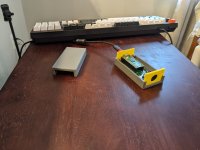
I've recently put together a simple board based around the pi pico that can emulate the QX-10 keyboard using a USB keyboard. I use one of the of the PIO to implement the synchronous serial protocol used by the QX-10 and at USB OTG adapter to connect my keyboard to the pico. It currently works fairly well with my QX-10 and QX-16. I designed this because I wanted to be able to pretend to be an ASCII variant keyboard, all my current keyboards use the HASCI layout.Thank you for the information, Fred. I have never tried to build a keyboard interface before but who knows, maybe I’ll surprise myself. If I get this figured out I’ll share with the group.
You can find the current kicad and firmware source files on my QX10 github repository.
DeltaDon
Veteran Member
I got my QX-16 working again. After modifying the QX-10 monochrome CRT to be able to use a 12vdc wall wart I got sidetracked with other project. When I came back to the QX16 I used the wrong adapter, right voltage, but too low current, and the CRT was acting up. It took a friend looking things over to figure out what was wrong.  So I have it setup and booting to CP/M for now. I'm using a QX10 keyboard on it since the QX16 keyboard has foil membrane keys and the TexElec foils are not exact replacements, IMHO. It seems time is my worse enemy and getting MSDOS working is my next dream. Plus adding the CF card adapter I've built from the bare board from Scott. Software is not my forte and GitHub scares the heck out of me. My aging brain cells need a lot more hand holding to understand what I'm looking at. When I went through navy electronics school the navy was just switching to transistors and I leaned troubleshooting working with tubes.
So I have it setup and booting to CP/M for now. I'm using a QX10 keyboard on it since the QX16 keyboard has foil membrane keys and the TexElec foils are not exact replacements, IMHO. It seems time is my worse enemy and getting MSDOS working is my next dream. Plus adding the CF card adapter I've built from the bare board from Scott. Software is not my forte and GitHub scares the heck out of me. My aging brain cells need a lot more hand holding to understand what I'm looking at. When I went through navy electronics school the navy was just switching to transistors and I leaned troubleshooting working with tubes.
fjkraan
Experienced Member
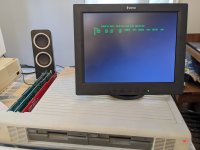
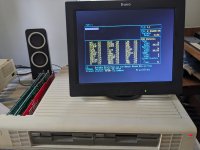
I actually have a original QX-16 monitor, but have been playing around with using an RGBtoHDMI for generating the video signal because I want to get color out of the QX-16 particularly for MS-DOS CGA. (If finding a monochrome QX-16 CRT is hard, then finding a color one is almost impossible). I've come up with a working CGA profile for MS-DOS and a green monochrome one for use with CP/M.I got my QX-16 working again. After modifying the QX-10 monochrome CRT to be able to use a 12vdc wall wart I got sidetracked with other project. When I came back to the QX16 I used the wrong adapter, right voltage, but too low current, and the CRT was acting up. It took a friend looking things over to figure out what was wrong.
Yeah the rubber dome/foil keyboard variant is not great, i have three of those and all three had non working keys due to the foam deteriorating. I did managed to repair one of them using some Brother keyboard contacts, though I think they are slightly larger then is ideal and some of the keys feel stiffer when depressing them, but all the keys work now at least.
Attachments
DeltaDon
Veteran Member
brijohn, I've been looking for a QX-16 monitor for years, mono or color, and I agree they are both rarer than unicorns, it seems. I never found a mono QX16 monitor. I did find a 2nd QX10 mono monitor that I've yet to test to see if it functions., but I couldn't let it go into recycling and grabbed it.
When I first worked on my first QX10 monitor I had to decide - modify the monitor or modify the QX16 to made the two play nice with each other. I believe adding an extra 12 volt power supply to the QX16 should be possible and routing a wire to the necessary pin on the video output should complete the mod's. There's some cheap 12V switching supplies on Amazon that should work.
I took the other route and used my bench power supply to measure the current draw by the monitor and realized I could just power the monitor with a wall wart and I had a couple of them here. For others reading this in the future, a 12 volt DC with 1 amp or more output adapter works and all you do is get power to the terminal strip inside the QX10 monitor with some wiring and a jack through the monitor's plastic case. I did it this way since it was cheap and there was a QX16 with QX10 monitor owner in Texas that wanted me to supply him with a cheap kit to make his system work. He didn't want to open his QX16, I believe.
When I first worked on my first QX10 monitor I had to decide - modify the monitor or modify the QX16 to made the two play nice with each other. I believe adding an extra 12 volt power supply to the QX16 should be possible and routing a wire to the necessary pin on the video output should complete the mod's. There's some cheap 12V switching supplies on Amazon that should work.
I took the other route and used my bench power supply to measure the current draw by the monitor and realized I could just power the monitor with a wall wart and I had a couple of them here. For others reading this in the future, a 12 volt DC with 1 amp or more output adapter works and all you do is get power to the terminal strip inside the QX10 monitor with some wiring and a jack through the monitor's plastic case. I did it this way since it was cheap and there was a QX16 with QX10 monitor owner in Texas that wanted me to supply him with a cheap kit to make his system work. He didn't want to open his QX16, I believe.
Ettore that's amazing ...complete & video
are you in Venezuela ?
As a starter, it will be great if you could dump the ROM from that Abacus into a file ...
If you are willing to, I will like to buy you that QX11
Hello Dan....what country do you live?Hello, i have a QX-11 with Floppy issues, i like to install linux with some hardware mods
First, it would be great if you can send pictures of your qx11. If possible can you take pictures of the inside of the qx11 showingneach of its ICs?
Second and this is a farther reach, do you have access to a eeprom writer/reader..can you take a copy of the qx11 ROM chips?
Third, I dont think it is possible to install Linux in a qx11. The Linux kernel runs in i386's protected mode, so. asically you need a 386 processor to run it. There is a project called ELKS that is a limited version of Linux you can run in an intel 8088 processor but it is extremely limited, so i dont know if that will work for what you are looking for.
last but not least, if you want to sell that qx11 I will like to buy from you..
have a good one
V. Prada
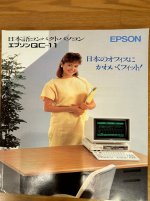
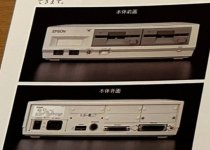
I found some additional information about the QX11..Same as the Qx10 in Japan the Qx11 was released as the QC11.
Another feature besides having MSDOS 2.11 in ROM, the qc11 had a rom cartridge. I never heard of anybody using the ROM cartidge in latin america, but in Japan there was a cartridge with all the japanese kanji characters. The cartridge allowed the QX11 to display japanese characters on screen.
Also looking a the motherboard pictures ettore published I was able to verify that the qx11 have a Texas Instrument SN76489. The 76489 is the same sound chip used on the IBM PcJr , the sega genesis, tandyn1000 and also on many arcades.
The QX11 also uses the same Floppy controller as an IBM PC, but despite n of that the format used in the 31/2 inches disk formatted on a qx11 was not readable on an IBM pc or viceversa.
I still wonder why this machine didnt make it into the american market. So far only places I have met people knowing the existance of the qx 11 are Japan and for some odd reason Venezuela.
Another feature besides having MSDOS 2.11 in ROM, the qc11 had a rom cartridge. I never heard of anybody using the ROM cartidge in latin america, but in Japan there was a cartridge with all the japanese kanji characters. The cartridge allowed the QX11 to display japanese characters on screen.
Also looking a the motherboard pictures ettore published I was able to verify that the qx11 have a Texas Instrument SN76489. The 76489 is the same sound chip used on the IBM PcJr , the sega genesis, tandyn1000 and also on many arcades.
The QX11 also uses the same Floppy controller as an IBM PC, but despite n of that the format used in the 31/2 inches disk formatted on a qx11 was not readable on an IBM pc or viceversa.
I still wonder why this machine didnt make it into the american market. So far only places I have met people knowing the existance of the qx 11 are Japan and for some odd reason Venezuela.
Attachments
Is there a way we can get in contact Ettore? I will like to talk about that qx-11 in more detail.. you can reach me at pradavic-at-gmailcomplete & video