
• Please review our updated Terms and Rules here

Pepper Pad 2 OS Image?

ajacocks

VCForum Administrator
Staff member
Joined
Jan 21, 2011
Messages
1,926
Location
Middletown, Maryland USA
I picked up a Pepper Pad 2 in fairly good condition from the VCF swap meet yesterday, and it looks like this:
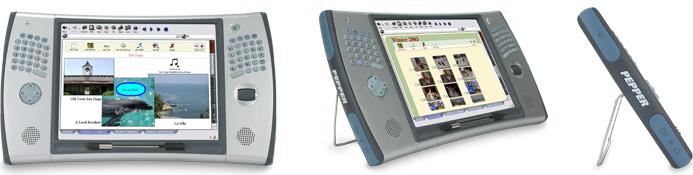
pepper_pad_2_rotation.jpg


Does anyone else remember this device? It's an early UMPC, before they evolved into modern tablets.

This particular device has a bad hard drive, which is one of the 1.8" IDE drives. I can easily enough replace the drive, but I don't have an operating system image. Does anyone have a drive, or an image hanging around? I searched a lot of the usual subjects, like archive.org and many of the Linux tablet sites.

Thanks!
- Alex
 
Hi, I was an engineer at Pepper. I stumbled across this thread by happenstance. The gold master images have probably been lost. The images were physical hard drives, which were expensive and therefore got reused. I have one disk that used to hold the GM image for v2.1.1 of the software, but upon inspection it was overwritten with something else (see attached).

I do have a couple of disks of the installed OS floating around and was able to pull a disk image off one of them. The disk had a post-it labeled “scratch” on it, so it might have extra junk that wasn’t part of the shipped OS. I can provide access to Pad owners; please DM me for a copy (assuming I can respond to a DM...maybe I don't have enough posts yet). It's about 3GB compressed, and I'll need someplace to put it.

Code:
mac:~ steve$ sudo dd if=/dev/rdisk4 of=/Users/steve/src/pepper-pad-2.dd bs=65536 conv=noerror,sync status=progress
Password:
  19990839296 bytes (20 GB, 19 GiB) transferred 1326.023s, 15 MB/s 
305180+0 records in
305180+0 records out
20000276480 bytes transferred in 1326.990434 secs (15071907 bytes/sec)

It's been quite awhile since I've booted up a Pad, but I'd be happy to try to answer questions. It was a fun project, but iPhone and iPad turned out to be more successful than we were. There was also a Pepper Pad 3, with a 7" widescreen and an AMD Geode CPU. The internals were much more like a stock PC and it ran a version of Fedora with our UI on top. Pad 3 was much faster than the XScale-based Pad 2, which was hindered by (among other things) lack of DMA to copy the screen from RAM to VRAM.
 

Attachments

  • IMG_3900.jpg
    IMG_3900.jpg
    1.1 MB · Views: 5
Last edited:
Thanks so much @smagoun ! I know that we’d love to hear the history of Pepper, in addition to just the OS image. Would you be willing to tell the story?

I just linked this post to my friend who has the Pepper Pad, now.

You can indeed respond to DMs, you just can’t send them, until you have 10 posts.

Thanks!
- Alex
 
I suspect this will be both too long and woefully incomplete....some history of Pepper Computer + the Pepper Pad:

Pepper Computer was started in early 2002 with the goal of building a user-friendly tablet computer for teenagers. The first business cards said "Hot Tools for Teens" (really...see attached proof). The co-founders were a husband+wife team of serial entrepreneurs, Len + Mary Ellen. Both are wonderful humans. Len had worked on VAX/VMS at DEC, and co-wrote Lotus Notes. He had some serious engineering chops, and had I been smarter+more humble, I would have spent a lot more time learning from Len*. Before Pepper, Len + Mary Ellen founded an e-reader company called Glassbook that was acquired by Adobe. Pepper in many ways was the next evolution of that vision.

I was one of the first engineers hired at Pepper. My previous startup job had evaporated overnight in the dotcom bust, and my boss at the time put in a good word with a local recruiter while Pepper was hiring (thank you Bob!). I had been doing Java development, and Pepper's software was going to be written in Java so that it could run on Windows, Mac, and this new device we were going to build.

The hardware was ahead of its time in many ways - we wanted to build a lightweight, stylish tablet with a big screen, great user experience, Wi-Fi, good performance, and long battery life. These requirements were really pushing the hardware of the time. I wasn't directly involved in the hardware selection, but we wound up with a design that used the Intel XScale chips that were also used in PDAs like the iPAQ. We built 5 or 6 prototypes of the original Pepper Pad, which had a vertical (portrait) screen and the signature feature of the Pads, a split keyboard to facilitate typing while holding the device. I've attached a photo of a device museum we had in the office; it includes a Pepper Pad 1 prototype.

The form factor of the original Pad was big + a bit unwieldy, and we built a new model with a screen in landscape mode. This was the Pepper Pad 2, which was the first variant ever offered for sale. Pad 2 had a faster PXA270 CPU in it, and the Intel 2700G graphics processor. We had high hopes for this combination, but it wasn't really designed to drive our huge-for-the-time 800x600 screen. Performance-sensitive applications like video playback spent a lot of time shuffling the framebuffer contents from RAM to the 2700G's VRAM because there was no DMA to the 2700G. We had hardware-accelerated MPEG video decoding working in the lab, but never shipped it due to a variety of factors including licensing and lack of content. Part of the licensing issue was that we used `mplayer` ,which is open-source, but the hardware-accelerated code was closed-source with an incompatible license. We did not have a closed-source video player that we liked.

The original OS for the Pad was intended to be a Java OS called SavaJe, and our apps would be written in Java to run on the OS. Java was still full of promise back then, but the OS wasn't mature and we scrapped it fairly quickly. Pad 2 ran a frankenstein version of Linux under the hood. It started life as Montavista Linux, and we heavily customized it. Pepper was always a small company - I think the peak was about 12 people - and most of us wore multiple hats. I wound up co-managing the Linux distribution, and spent a great many hours packaging software or upgrading/replacing packages in the distro we eventually called Pepper Linux. I believe a fair amount of the Pad 2 runtime wound up being derived from Fedora Core 4. There are some undocumented or semi-documented shortcuts such as Ctrl-Shift-T (or Ctrl-Shift-1?) to bring up a terminal.

Len + Mary Ellen had strong ideas about user experience, and wanted the Pad to be simple - not like a computer. New hires had to read Jef Raskin's The Humane Interface to understand how people think and interact with technology. We tried to eliminate all of the administration. Examples included automatically saving data (which was relatively novel at the time); eliminating as many settings and dialogs as possible; and using only full-screen windows so that window management was not an issue. We implemented an automatic updater so that the device would get better over time without the user doing any work. I don't recall all of the details, but I believe we wound up leveraging parts of yum/rpm with our own update code layered on top of it as `pup` - the Pepper UPdater. We had a built-in app store too, which was novel at the time.

The user interface was a Java application - the Keeper - which served as a launcher for other apps like the music app; web browser; etc. The "Keeper" name is derivative of the Trapper Keeper, which grade school students from the 1980s might remember as the cool way to store your assignments. Applications were Java apps with an HTML interface, rendered by our embedded HTML renderer. Application data was stored as XML 'pages' that were transformed by XSL + rendered as HTML. This allowed us to have "skins" (XSL stylesheets) to let users reskin an app without changing their data (think Winamp skins, but for all apps). This was of course a lot to ask of the hardware of the time. Even better, the original HTML renderer was a Java library called "IceBrowser" that we licensed from someplace. We used IceBrowser for our web browser's rendering engine in addition to our application renderer. However IceBrowser was designed for in-app help pages, and was not up to the task of rendering the actual web at the time, so I spent several months fixing a whole menagerie of parsing/layout/styling/rendering/performance bugs. Despite our efforts we realized that IceBrowser was always going to hold us back, so we eventually replaced it with JRex, a Java wrapper around Mozilla's renderer. This might have been the jump from v1 to v2 of our software. JRex and the JNI java-to-native bridge was a massive hassle to work with, but the Mozilla engine was a much better browser engine than IceBrowser and allowed us to have a proper web browser experience on the device. We also realized that native components were sometimes a better fit for our applications than the XML+XSL+HTML solution. I recall that at one point Len and I disagreed about ditching the browser-based apps in favor of more native code. I built a test version of the music application using Java Swing components instead of HTML components and then loaded it up with several hundred songs. The native Java UI rendered an order of magnitude faster than the browser-based solution. That was the end of that argument!

(Pt 2 to follow)


* At one point Len was frustrated with performance in the browser so he sat down and over the course of an afternoon banged out some optimized ARM assembler to reduce function call overhead in Mozilla. I was at least smart enough to be impressed by this.
 

Attachments

  • IMG_3056.JPG
    IMG_3056.JPG
    1.8 MB · Views: 15
  • pepper-captioned.jpeg
    pepper-captioned.jpeg
    48.2 KB · Views: 15
Part 2/2:


Running Mozilla as our browser engine also allowed us to run Flash. We got a source license to an embedded Flash SDK from Adobe. It didn't quite work, and it fell on me to patch it up to pass their compliance suite so that they'd allow us to ship it. There were plenty of x86-isms that we had to flush out, and we had to make it tablet friendly since there was no mouse cursor on the Pad. There were also weird interactions between Flash and our various OSS packages like X11, and plenty of performance challenges. We compiled everything as -O3, but optimizer bugs were plentiful so sometimes we had to back down to a lower (or no) optimization for a given file. After a couple stressful days making last-minute fixes while in the Adobe office, I got the tests to pass - barely - and we got sign-off to ship it. The Pad shipped with a few Flash games that were licensed from some casual game studio.

We wanted users to be able to collaborate with each other, for example to build a scrapbook together, so apps had native sharing + syncing capability. One user could start a page in a scrapbook, then share that page with another Pepper user via instant messaging or email. They could then edit it and share their edits with each other (or other users). This was long before collaborative editors like Google Docs, and we thought this might be great for students collaborating on group projects. That use case never gained any traction. The syncing capability was useful for loading media or making backups. To load music onto the Pad, you could run the Pepper Desktop app on your PC or Mac (which had all the same apps as the Pad since they were Java + HTML), point the Pepper Desktop Music Player at your iTunes library, then hit "sync" to sync the music from your desktop to your Pad. No need to hassle with Windows shares! I wrote most of the syncing+sharing system, and was quite proud of it at the time though looking back it was fairly rudimentary.

Some more tidbits about the Pad 2 hardware. We were adamant that the Pad couldn't be more than 0.75" thick, and our hardware designers said it couldn't be done. Everything was bigger then, and we had features like a recessed screen (to protect it) and the built-in-stand that added thickness. We kept at it (and kept them at it), and eventually got there. During the prototyping phase we had an issue with clearance in one place - we couldn't figure out why the housing wouldn't close all the way. We had the bright idea to stick a piece of chewing gum on the board in the place we suspected an issue, and then tried to close the housing again. The offending protuberances left an imprint in the gum, which helped us figure out what needed to be shaved down. The Pad was also intended to be spill-proof, which is why it has the tight-fitting rubber doors on the sides and the waterproofing around the speakers.

I believe we were trying to hit a retail price of $499. After factoring in manufacturing, margin for the retailers, spoilage, RMA costs, etc our entire bill of materials had to be 1/3 of MSRP in order to make any money. The hard drive alone was something like $80 though, and Pad 2 was sold at a loss despite the higher retail price.

The Pepper Pad 3 was an attempt to build a more-performant device with better economics. We redesigned it around an AMD Geode CPU, which ran circles around the XScale and allowed us to tap the x86 ecosystem for software. The smaller screen also saved a lot of money. We partnered with a Korean company called "Hanbit" to manufacture the Pad 3; they licensed the design and sold it under our name. I am told that "pepper" is Korean slang for male anatomy, and that they had a good laugh over our name.

A lot more Pad 3s made it to market than Pad 2s, but we never had a breakout moment. We shifted our model to try to license the software to other devices, but this never gained much traction either. At one point we were in negotiations with the OLPC team to put our UI onto the OLPC instead of their Sugar UI, which was having some teething + developmental delays at the time. OLPC eventually got their software sorted out. We also worked with Asus to put Pepper Linux on the Eee PC (the first netbook), but they ultimately didn't want to pay us any money and they launched with another distro.

iPhone also came to market around this time. iPhone was just as much a shock to us as it was to the rest of the world. Though the form factor was different, Apple accomplished what we set out to do with the Pad: build a next-generation computing device for the masses. The Pepper engineering team was eventually acqui-hired by Canonical, and Pepper closed down in late 2007.

It's hard to cram 5 years of a startup into a forum post, and I'm sure I've left out or forgotten plenty of interesting or important bits. I enjoyed looking back to write this up, and am happy to answer questions. We used to have a user forum at pepper.com, and it's possible there's lots more interesting stuff buried in archive.org's copy of the forums.

-- Steve
 
Also wanted to chime in - thank you Steve for adding your thoughts! Isn't it amazing how things can be optimized over what is shipped, as in the case of the Mozilla optimization you mentioned...
 
Hey Pepper Pad folks, Steve thank you for your write-up - that was amazing. I was really into the Pepper Pad back when it came out, I remember dealing with support quite a bit back in the day since I was such a keener for the platform :biggrin:

I still have two Pad 2's and I used to have a Pad 3 but ended up selling it. I only ended up with two Pad 2s because the power jack broke on my first unit, and Pepper sent me a replacement and said not to worry about sending the broken one back. My broken one sat for years before I fixed the power jack, so it never got the final Keeper 3.2 upgrade - it was on 3.0.3

I was active on the old dev forums and even ended up putting together some XUL-based apps for it, and even ran a wiki site about it, and I've been working on documenting the hardware and hacking various things.

For years now I've been trying to find something useful to do with those machines, as the hardware and form factor was just so different. It's really a shame that the 2700G chip never got proper support on Linux. For a while there I tried really hard to get a 2.6.16 kernel working by updating the 2.6.13.4 kernel patches that Pepper released. Since the last shipped kernel is still on the "old" ARM ABI, it makes building more modern software or Linux kernels quite difficult. Getting it working on the "new" ARM EABI means being able to use much newer GCC versions as well as being able to build a functional cross-compiler, use the kernel framebuffer driver for the 2700G, etc... Alas, I never got this working and haven't looked at it in a few years.

The Pad 2 had some interesting stuff: three ports, one labelled JSERIAL which is connected to the first UART, U-Boot and the Linux system console use it, one labelled JJTAG or something which I assume is hooked up to the CPU JTAG interface, and JDEBUG which I never figured out. There's also a row of 8 LEDs inside which are not visible with the case on but are connected to system GPIOs, I actually wrote a kernel module that lets me turn them on and off via a /proc device. You can see all of that on the motherboard photo on the eLinux page (which I wrote): https://elinux.org/Pepper_Pad_2

I've also gotten my units to run from CompactFlash using a 1.8" IDE to CF adapter, though neither of my original disks failed, I also haven't spun them up in years either. All of this is sitting in my Github gist...

Long ago I made backups of both of my Pad 2 disks, and but I regretted is that I never grabbed an image of the v2 software before upgrading - I remember that it ran faster than the v3 did on the Pad 2 hardware. Steve, do you happen to have an image of that? Or any other hardware information about the Pad 2? I never could figure out what kind of connector the JSERIAL port used and ended up making one myself using an FPC cable plus an extra piece of plastic to make it thick enough.

Unfortunately, though the old Pepper Forums are on archive.org, the file attachments are not; and after 3.0.3 they were uploaded to updates.pepper.com and I never thought to archive that site, so I am missing some of the patches for open-source packages that Pepper had to publish back in the day - primarially, patches to u-boot and wpa_supplicant would help me out a lot. I fear they're lost to the ages now ...
 
Last edited:
Hey Victor! I remember you from chuma.org + the forums. We loved having engaged users and were excited to see the beginnings of a community.

I think we had an EABI build of the base OS (without keeper) kicking around on one of the machines in the lab, but there was no easy path to safely upgrade OABI to EABI in the field. It's possible we didn't have an EABI-compatible build of the JVM, either. We didn't spend much time trying to move to EABI since we were focused on Pad 3 at that point. My recollection is that moving to EABI would have let us use the WMMX instructions for improved performance (especially video playback, or so we hoped).

I don't have the hardware specs and don't have much recollection of the interfaces on the board; in particular I'm not sure what JDEBUG was for. I suspect a lot of that stuff (like the LEDs) was carryover from the reference design from Intel.

v2 of the OS might be lost to time. It was a long time ago at this point, but I think the move from v2 to v3 might have been when we tried to get the base OS for Pad 2 into a rebuildable state. Many of our original OS customizations were hand-built on another developer's workstation with a cross-compiler, and then copied to his pad for testing. Then we'd duplicate that pad's disk to be the gold master disk image. At one point I spent at least a few weeks digging up + packaging those changes so that we could rebuild packages from source in a proper server environment. Montavista Linux was an RPM-based distribution, but its packages were often quite old. The Pepper Pad 3 started out using Fedora Core 4, (which was also RPM-based), so in order to get newer packages + continuity with Pad 3, we started building Pad 2 packages based on FC4. We never did a wholesale upgrade of Pad 2 to FC4, but I recall much of the interesting stuff like X11 and GTK did get ported to Pad 2.

I don't think we got all of our Pad 2 patches properly packaged (for example I'm not sure we ever had a kernel source RPM), but we did get most of it done. I don't remember if we put patches or SRPMs on updates.pepper.com, but buried in an old disk of mine I did find some source RPMs that I think correspond to open-source patches that we made available for 3.0.3/3.1.0/3.2.0. I don't see uboot in there, but I do have wpa_supplicant. DM me for a link to the SRPMs.


Edit: The disk image I mentioned in a previous post appears to be v2.1. DM me for a link.
 
Last edited:
Hi Steve! Thanks so much for replying and for digging through your old files.

Source RPMs would be just as good as the patch files of course. I can't DM you here since I'm still a n00b according to this forum, but you've got my first name and my domain name, stick them together and you've got my email address :)
 
Back
Top